
No products in the cart.
Single Tower 6 Heatpipe CPU Cooler: How to Achieve Optimal Cooling in Compact Spaces
Building a compact desktop PC requires careful consideration of component size, airflow, and thermal performance. Although smaller cases help save desk space, their limited internal volume can make CPU cooling more challenging. A suitable air cooling solution should provide efficient heat transfer without interfering with memory modules or other components. Therefore, choosing a single tower 6 heatpipe CPU cooler can be a practical option for users who want to balance cooling performance, installation flexibility, and system appearance.
Why Choose a Single Tower CPU Cooler for Compact Spaces?
A single tower CPU cooler uses a vertical heatsink structure to transfer heat away from the processor and release it through surrounding airflow. Compared with larger dual-tower designs, this configuration can occupy less space around the motherboard and simplify installation in many desktop cases. Moreover, a compact tower cooler may provide better clearance for nearby components, depending on its dimensions and mounting position. This makes it suitable for gaming desktops, office workstations, and other systems where internal space is limited.
However, cooler size alone does not determine cooling performance. Heatpipe design, fin density, fan airflow, and the contact between the cooler base and CPU all influence heat dissipation. As a result, buyers should evaluate the complete cooling structure instead of selecting a CPU air cooler based only on its appearance or advertised heatpipe count.
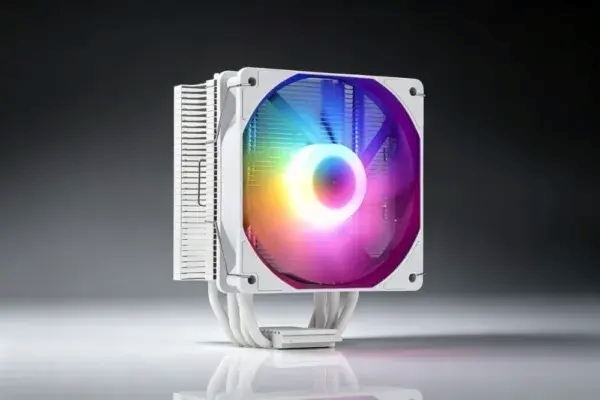
Key Cooling Features of the YH-HP-15 CPU Air Cooler
The YH-HP-15 is designed around a compact single tower structure with a black-plated heatpipe design and a 120mm RGB PWM fan. Its aluminum fin stack provides a heat dissipation surface, while the copper heatpipes transfer heat from the CPU contact area toward the heatsink. In addition, PWM fan control adjusts fan speed according to system cooling demand, helping balance airflow and operating noise.
The following table summarizes the supplied product information.
| Specification | Product Details |
|---|---|
| Model | YH-HP-15 |
| Cooler Type | Single Tower CPU Air Cooler |
| Overall Dimensions | 153 × 75 × 122mm |
| Net Weight | 680g |
| Heatpipe Design | Black-plated heatpipe design |
| Heatpipe Material | Copper |
| Heatpipe Count | Confirm with manufacturer: product title states 6; detailed specification states 4 |
| Fan Size | 120 × 120 × 25mm |
| Fan Quantity | 1 |
| Fan Speed | 2500 ±10% RPM |
| Airflow | 45–55 CFM |
| Noise Level | 20dB |
| Fan Current | 0.28A |
| Fan Voltage | 12V DC |
| Fan Bearing | Hydraulic |
| Fan Control | PWM |
| Lighting | RGB |
| Listed Cooling Power | ≤170W |
| CPU Compatibility | AMD FM/AM3/AM4/AM5; Intel LGA 775/1150/1151/1155/1156/1200/1366/1700/2011 |
How Heatpipes Improve CPU Cooling Efficiency
Heatpipes help move heat away from the CPU contact area and distribute it across the heatsink. Inside each heatpipe, a working fluid absorbs heat, evaporates, and moves toward a cooler section, where it releases heat and condenses. This cycle supports heat transfer across the cooler structure. Consequently, the number, placement, material, and contact quality of the heatpipes can all influence the overall thermal performance.
The single tower 6 heatpipe CPU cooler concept is particularly relevant to compact builds because multiple heat transfer paths can help distribute processor heat across a relatively narrow heatsink. However, heatpipe quantity should not be treated as the only performance indicator. Fin design, mounting pressure, thermal interface material, fan airflow, and case ventilation also need to work together to achieve effective cooling.
The Role of a 120mm RGB PWM Fan
The cooling fan moves air through the heatsink fins, carrying heat away from the CPU cooler. The YH-HP-15 uses a 120mm hydraulic-bearing fan with a listed speed of 2500 ±10% RPM and airflow of 45–55 CFM. Its PWM function allows the motherboard to regulate fan speed according to CPU temperature and workload. Therefore, the fan can operate at a lower speed during lighter tasks and increase airflow when the processor generates more heat.
RGB lighting also adds visual customization to gaming PC builds. For users who want a coordinated system appearance, an RGB CPU cooler can complement illuminated memory, case fans, and other components. Nevertheless, buyers should confirm the lighting connector and synchronization method if motherboard software control is required.
Practical Tips for Installing a Tower Cooler in a Compact PC
Proper installation helps the cooler perform as intended and reduces potential clearance issues. Before purchasing, users should compare the cooler dimensions with the available space inside the PC case and check the motherboard layout. The following steps can help make the installation process more reliable.
- Check case clearance: Confirm that the case supports the cooler’s 153mm height and provides sufficient room around the motherboard.
- Review memory clearance: Check the position of the RAM slots and nearby components before installing the heatsink and fan.
- Apply thermal paste correctly: Use an appropriate amount of thermal interface material to support effective contact between the CPU and cooler base.
- Secure the mounting hardware: Follow the installation instructions and tighten the mounting system evenly to maintain stable CPU contact.
- Optimize case airflow: Use suitable intake and exhaust fans to help move warm air out of the case.
- Monitor CPU temperatures: Test the system under normal and demanding workloads to evaluate cooling performance after installation.
CPU Compatibility and Application Scenarios
Socket compatibility is another important factor when selecting a tower cooler. The YH-HP-15 supports a range of AMD and Intel platforms, including AM4, AM5, LGA 1200, and LGA 1700. However, buyers should confirm the exact mounting bracket configuration and included accessories for their target motherboard before ordering.
This type of tower cooler can be considered for gaming desktops, home computers, office workstations, and other systems that require air cooling within a compact internal layout. Its RGB fan also makes it suitable for PC builds where cooling hardware contributes to the overall visual design. For higher-power processors, users should evaluate the actual thermal requirements and verify cooling performance under the intended operating conditions.
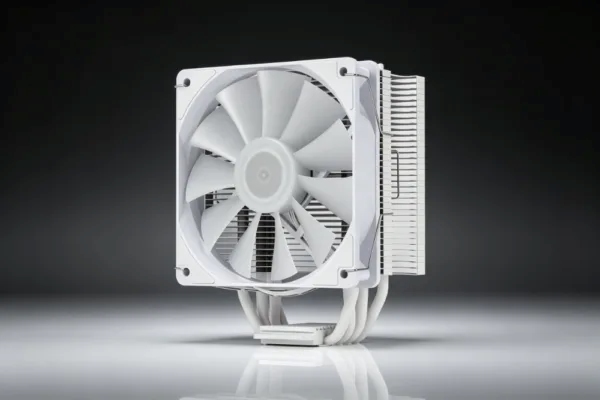
Working with a CPU Cooler Factory for OEM Projects
For computer hardware brands, distributors, and PC system integrators, working with a CPU cooler factory can help coordinate product specifications and customization requirements. Important considerations may include cooler dimensions, fan configuration, lighting design, surface finish, mounting compatibility, and packaging. In addition, buyers should request confirmed technical specifications and product samples before finalizing a bulk purchasing plan.
Yanghai offers CPU cooling products for different desktop hardware applications. For OEM and ODM projects, customers can discuss options such as custom logos, fan configurations, finishes, and packaging according to project requirements. Providing the target CPU socket, case dimensions, and expected thermal load can help determine whether a particular cooler configuration is suitable.
Conclusion
Achieving effective CPU cooling in a compact PC requires a balance between heatsink dimensions, heat transfer, fan airflow, component clearance, and case ventilation. The single tower 6 heatpipe CPU cooler design combines a space-conscious tower structure with a heatpipe-based heatsink and a 120mm RGB PWM fan. The YH-HP-15 offers broad listed Intel and AMD socket compatibility, making it a potential option for gaming and desktop PC builds. Before selecting it for a specific system, confirm the heatpipe count, mounting hardware, and thermal performance under the intended CPU workload.

Add comment