
No products in the cart.
Double Tower CPU Cooler: How 6 Heat Pipes and Dual Fans Maximize Cooling
Keeping a CPU cool during demanding workloads is essential for system stability and consistent performance. However, intensive gaming, video rendering, and 3D modeling can generate considerable heat, making cooler design an important consideration. A double-tower CPU cooler combines an expanded heatsink structure with multiple heat pipes and fans to improve heat dissipation. Therefore, it can be a practical option for desktop builds that require effective air cooling.
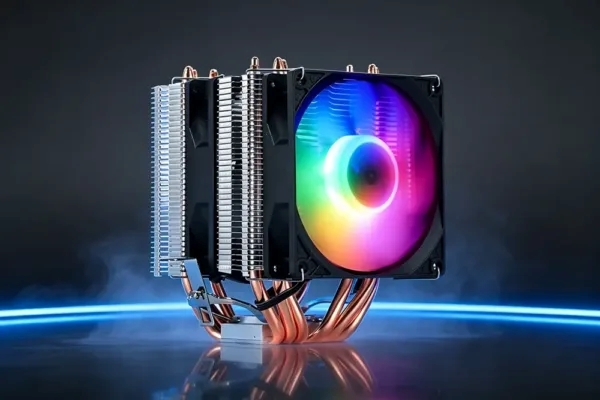
The YH-HP-09 dual-tower CPU air cooler features six copper heat pipes, a dual-tower aluminum heatsink, and two fans. Its black-plated finish gives the cooler a clean appearance, while fixed-color lighting adds visual interest to a desktop build. By combining these components, the cooler aims to balance thermal management, airflow, and system aesthetics.
1. How a Dual-Tower Design Improves Heat Dissipation
A dual-tower air cooler uses two heatsink sections to provide additional surface area for heat dissipation. As the CPU generates heat, the cooling structure transfers thermal energy away from the processor and distributes it across the aluminum fins. Meanwhile, airflow through the heatsink helps carry heat away from the system. This design can support demanding desktop applications when the cooler matches the processor’s thermal requirements and the case provides sufficient ventilation.
The YH-HP-09 features a dual-tower aluminum fin heatsink designed to support airflow through both sections. Its stacked fin structure creates multiple paths for air to move across the cooling surfaces. As a result, the design helps distribute heat throughout the heatsink rather than concentrating it around the CPU contact area. However, actual cooling performance depends on processor power consumption, case airflow, and fan operation.
2. Why Six Copper Heat Pipes Matter
Heat pipes transfer thermal energy from the CPU contact area toward the heatsink, where airflow can remove the heat. A 6-heat-pipe CPU cooler uses multiple heat transfer paths to distribute thermal energy across the cooling structure. This arrangement can help support demanding workloads, although the overall results also depend on heat pipe design, heatsink construction, and airflow.
The YH-HP-09 uses six black-plated copper heat pipes with direct-contact cooling. The black plating helps protect the copper surface against oxidation and corrosion while maintaining the cooler’s consistent appearance. In addition, the direct-contact design places the heat pipes close to the CPU surface to facilitate heat transfer. These features make the cooler worth considering for compatible desktop systems that need a substantial air-cooling structure.
3. How Dual Fans Support Gaming and Heavy Workloads
Fans play an important role in moving heat away from the heatsink. With two fans, a cooler can move air through its fin stacks to support heat dissipation across both towers. Consequently, a gaming CPU cooler with a suitable dual-fan arrangement may help maintain thermal performance during extended gaming sessions and other CPU-intensive tasks.
The YH-HP-09 includes two fans with PWM control and fixed-color lighting. PWM allows compatible motherboard controls to adjust fan speed according to system settings and temperature. Meanwhile, the lighting adds a visual feature for gaming desktops and custom PC builds. For the best results, users should ensure that the case provides enough intake and exhaust airflow to prevent hot air from accumulating around the CPU cooler.
4. Main Specifications of the YH-HP-09
When selecting a high-performance CPU cooler, buyers should review the cooling structure, fan operation, rated capacity, and motherboard compatibility. The following table summarizes the specifications provided for the YH-HP-09 to help system builders compare it with their requirements.
| Specification | YH-HP-09 Details |
|---|---|
| Cooler type | Dual-tower CPU air cooler |
| Heat pipes | 6 copper heat pipes |
| Heatsink material | Aluminum fins |
| Fan quantity | 2 |
| Fan speed | 2500 ± 10% RPM |
| Airflow | 45–55 CFM |
| Stated noise level | 20 dB |
| Fan control | PWM |
| Fan power rating | 0.28 A, 12 V DC |
| Lighting | Fixed-color lighting |
| Stated cooling capacity | Up to 120 W |
| AMD sockets | FM, AM3, AM4, AM5 |
| Intel sockets | LGA 775, 1150, 1151, 1155, 1156, 1200, 1366, 1700, 2011 |
Before purchasing, users should verify the cooler’s mounting hardware and the exact socket support required for their motherboard. They should also check the available case clearance, RAM height, and fan placement. Although the dual-tower structure provides additional heatsink surface area, physical compatibility remains essential for a successful installation.
5. Benefits of a Black-Plated CPU Cooler
Appearance can be an important factor when building a gaming PC or a desktop with a coordinated component theme. A black-plated CPU cooler offers a dark finish that can complement black motherboards, graphics cards, and cases. In addition, the YH-HP-09 combines its black-plated heat pipes with fixed-color fan lighting, creating a consistent visual style.
Beyond appearance, buyers should focus on the cooler’s construction and suitability for their systems. Heat pipe contact, fin arrangement, fan control, and case ventilation all influence the cooling result. Therefore, builders should compare the complete cooling design instead of choosing a cooler based on color or lighting alone.
6. Choosing a CPU Cooler for Demanding Desktop Applications
A double-tower CPU cooler may suit desktop systems used for gaming, video rendering, 3D modeling, and other workloads that place sustained demands on the processor. Nevertheless, buyers should match the cooler’s stated thermal capacity to the CPU’s power requirements. They should also consider the duration of heavy workloads, room temperature, and the case’s ventilation design.
When comparing cooling options, consider these factors:
- Thermal capacity: Confirm that the cooler is suitable for the processor’s power requirements.
- Heatsink design: Assess whether the tower structure suits the intended workload and case.
- Fan control: Check PWM support and the motherboard’s fan-control capabilities.
- Physical clearance: Verify case dimensions, RAM clearance, and mounting compatibility.
- Noise expectations: Review the stated noise level and consider real-world operating conditions.
Yanghai offers the YH-HP-09 for businesses and PC builders evaluating dual-tower air-cooling products. By reviewing the product specifications alongside processor requirements and system layout, buyers can determine whether it meets their intended application.
Conclusion
Effective CPU cooling depends on more than the number of fans or heat pipes. A suitable combination of heatsink surface area, heat transfer, airflow, and system compatibility helps support stable operation under demanding workloads. The YH-HP-09 combines a dual-tower heatsink, six copper heat pipes, and two PWM-controlled fans in one air-cooling solution.
For buyers considering a double-tower CPU cooler, the key is to match its stated cooling capacity to the processor and confirm installation compatibility. With careful component selection and adequate case ventilation, builders can create a desktop system that balances cooling needs, practical installation, and visual appeal.


Add comment