
No products in the cart.
Low-Profile RGB CPU Cooler: How to Fit High Performance in a Slim PC Case
Building a compact PC requires careful component selection, especially when space and cooling performance matter. Slim cases often limit cooler height, making it difficult to manage CPU temperatures under demanding workloads. A low-profile RGB CPU cooler offers a practical balance between compact dimensions, efficient heat dissipation, and attractive lighting.
The YH-HP-48 from Yanghai combines a black-plated heatsink, copper heat pipes, and a PWM RGB fan in a compact design. Its low-profile structure and broad listed AMD and Intel socket compatibility make it an option for compatible small-form-factor desktop builds.
1. Why Low-Profile Cooling Matters in Slim PC Cases
Slim PC cases save space but often restrict cooler height and airflow. As a result, traditional tower coolers may not fit, so builders need a slim CPU cooler that meets the enclosure’s clearance requirements. Choosing the right model helps prevent installation conflicts while maintaining effective thermal management.
However, compact dimensions alone do not guarantee good cooling. Buyers should also consider heat transfer, fan airflow, processor power requirements, and case ventilation. These factors work together to determine whether a cooler can handle the intended workload.
2. How Five Copper Heat Pipes Improve Cooling
Heat pipes transfer thermal energy from the CPU contact area to the heatsink, where airflow helps dissipate heat. A 5-heat-pipe CPU cooler provides multiple heat transfer paths, helping distribute heat across the cooling structure.
The YH-HP-48 features five black-plated copper heat pipes and a black single-tower heatsink. Its fin array provides a surface for airflow to remove heat while maintaining a compact profile. This design can benefit small PC builds, although actual cooling performance depends on the processor, case airflow, and operating conditions.
3. RGB Lighting and PWM Fan Control
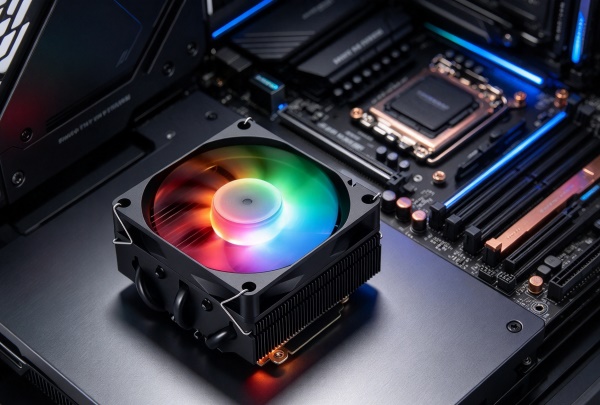
Modern PC builders often want both cooling performance and an attractive appearance. RGB lighting adds visual interest, while PWM fan control allows compatible motherboards to adjust fan speed according to system temperature and settings. The YH-HP-48 uses a slim fan with hydraulic bearings and RGB lighting. Its adjustable speed helps balance airflow and noise under different workloads. For office PCs, home theater systems, and compact gaming builds, this combination offers practical cooling with a coordinated visual design.
4. Key Specifications of the YH-HP-48
When choosing a CPU cooler for small case builds, buyers should verify physical clearance, mounting compatibility, and cooling requirements. The following table summarizes the product’s main specifications for easier comparison.
| Specification | YH-HP-48 Details |
|---|---|
| Cooler type | Black-plated CPU air cooler |
| Overall dimensions | 100 × 92 × 50 mm |
| Fan dimensions | 92 × 92 × 15 mm |
| Heat pipes | 5 copper heat pipes |
| Fan quantity | 1 |
| Fan speed | 2500 ± 10% RPM |
| Airflow | 45–55 CFM |
| Rated noise level | 30 dB |
| Fan control | PWM |
| Bearing type | Hydraulic |
| Lighting | RGB |
| Stated cooling capacity | Up to 180 W |
| Net weight | 310 ± 10% g |
| Fan power rating | 0.28 A, 12 V DC |
| AMD sockets | FM, AM3, AM4, AM5 |
| Intel sockets | LGA 775, 1150, 1151, 1155, 1156, 1200, 1366, 1700, 2011 |
Before installation, confirm that the cooler supports your motherboard socket and fits within the case’s maximum CPU cooler height. Also check memory clearance and nearby components to avoid mounting conflicts.
5. Choosing a Mini ITX CPU Cooler
A mini ITX CPU cooler must fit a compact motherboard layout while meeting the processor’s thermal requirements. Since small-form-factor cases vary in design, builders should check clearance limits instead of assuming every low-profile cooler will fit.
Consider these factors before purchasing:
- Case clearance: Ensure the cooler fits beneath the side panel.
- CPU requirements: Match the cooler’s capacity to the processor and expected workload.
- Airflow: Check whether the case provides sufficient intake and exhaust ventilation.
- Compatibility: Verify the socket and mounting hardware.
- Noise and appearance: Consider fan noise, PWM control, and RGB lighting preferences.
The YH-HP-48 combines a compact structure with RGB lighting, making it worth considering for compatible builds where cooler height is limited. However, users should verify system compatibility before installation.
6. Applications for Compact PC Builds
Compact air coolers can suit office desktops, home theater PCs, and selected small-form-factor gaming systems. For these applications, a low-profile design can help builders make better use of limited internal space without choosing an oversized cooling solution.
Nevertheless, the best choice depends on the CPU, enclosure, and workload. Systems running demanding applications for extended periods need particular attention to thermal capacity and case ventilation. Buyers should also confirm that the cooler’s mounting arrangement suits their motherboard. Yanghai offers the YH-HP-48 for users seeking compact air cooling with RGB styling. Its heat pipe design, adjustable fan, and listed socket support provide useful features for compatible desktop configurations.
Conclusion
Choosing the right cooler helps builders balance space, thermal performance, and appearance in a slim PC case. By checking case clearance, processor requirements, and motherboard compatibility, users can avoid installation issues and select a suitable cooling solution. The YH-HP-48 combines copper heat pipes, PWM fan control, and RGB lighting in a compact design. For anyone considering a low-profile RGB CPU cooler, matching the cooler to the complete system remains essential for reliable performance.

Add comment